Fighting the garbage collector

Wrestling with Trashie; the garbage collector via Craiyon.
What is the garbage collector
We’re assuming the reader is a game developer, from a non technical background and is using C# (or another managed language that acts an awful lot like it) and is on windows. Which mostly means, yes ‘language/system X doesn’t quite work that way’ is entirely expected. Feel free to still throw those at me but for now, we narrow the focus. And on with the show.
Well, I’d like for there to be a simple answer. There kinda is one. But it mostly raises more questions if you aren’t already familiar with the topic area. And that same answer is not very useful or actionable if you are familiar with the topic area.
Nevertheless, it is where we begin. With a kind of theoretical ideal of what garbage collection is. Meaning it’s incomplete, and has a few fibs in it. We’ll hopefully clear them up later when we get the nitty gritty.
The simple answer.
This needs some specific terms, we're going to use them here and then go over them later. This is frustrating, I agree.
In a managed language (such as C#), every allocation is tracked, and the runtime deals with the de-allocation for you. And for a time things are good. Eventually though, you’ve asked for so much/many allocations that the runtime decides that’s enough of this silly endless allocating, surely some of the things you created are not actually in use anymore. Those no longer in use ones, those are the garbage. And the runtime is going to collect them all and de-allocate (or free) them. This prevents you from endlessly needing more ram, and makes you program closer to a model citizen in the operating system society.
Ok that’s great but Unity is showing that I’m dropping frames because of the Garbage Collector, so what do I do with that?
We’ve painted a picture of you, the programmer, strolling around town, using what thou wilt, throwing candy bar wrappers and empty drink cans to the ground at your feet without a care in the world. An army of cleaning robots chasing you around, making your bed, washing the clothes you leave on the floor, wiping your butt, and driving you to the office. If there was no downside some might say that sounds pretty good.
Ahh, no, that sounds pretty bad actually.
Devils in the details?
There’s technical terms, and phrases doing some pretty heavy lifting in there.
Managed language - Rather than directing or indirectly asking the operating system for memory, your code talks to the language runtime. It sits between how the Operating System is providing access to system resources and what your code is allowed to do with them. This typically occurs at the level of Objects. There’s a lot more to talk about regarding managed languages but that’s for another day.
Allocation - When something non-transient is made and it needs space to live. Our program deals with this usually by having them be in RAM, at some address. In our higher level language like C#, these are object types, anything that is a class, is an allocation. The program and runtime pass around the locations of things in order to refer to them. In C, that’s a pointer or a handle. Managed languages don’t like to talk about it, but it’s the same idea there too.
Not in use anymore - Yep, that’s a vague and confusing thought. The runtime usually defines this as, the allocation is no longer reachable from the program's entry point. Slightly more technical, every bit of memory you can chase down through a pointer starting at the beginning of the program is in use. Everything that has been allocated that cannot be found in this way, is not in use, it’s garbage. Chasing these things down is tied to the type system, the runtime knows what type everything is, so it knows which places in memory are what type and all the connections out of them to other known types of things points to and so on.
Collect them all - Yep, that is very vague and seems like it’s hiding something non-trivial. There are a number of ways of achieving the goal, but if we imagine it like double entry bookkeeping, the garbage is the difference between the two. A mark and sweep algorithm is this concept and it (or some variation of it) is one of the most common GC approaches.
Free - This is hiding some nuance we hope, but when we allocated, we got memory from somewhere. Freeing it returns that memory for future use.
Enough of this silliness - How does it determine when it’s no longer a reasonable amount of memory for our program to be using, can we control that? Often the answer is no, you can’t. Because what it is doing internally is intricate and delicate. So to avoid degenerate usages, various tweaking values have been determined by testing or are dynamically adjusted by the runtime based on the usage it sees. The GC will do a fine job covering all the bases but it cannot know your specific case. We get the best out of it if we act in the way it expects. Often all you are allowed to tweak is adding more real or artificial allocations, and requesting that it start a collection cycle even if it doesn’t think it needs to yet. The other wrinkle here is that what determines ‘too much’ is often pressure. The total amount of memory your program has requested, but that doesn’t map 1 to 1 with the number of allocations you’ve made or how intensive it will be for the runtime to chase them all down.
What’s that Tradeoff?
Doing the memory cleanup yourself means mistakes can happen, you just forget to, or sometimes the circumstances make it hard to know when the memory can be cleaned up. There are strategies for these bugs but in some languages you, the programmer, don’t control when allocations happen at all. So how can you be expected to deal with them? That’s very fair. In those languages garbage collection is fundamental to the design.
The trade is we’ve turned a mirrored and dead simple thing into a far more intricate and opaque one. From; operating system, give me this resource please <-> here operating system I am done with this resource. To; Runtime make me a new instance of this object please <-> (at some future time), the runtime decides it wants to clean your room to reclaim some resources.
When things are good, you don’t think about resources. When things are bad, there’s not a lot of control you have over how resources are acquired and released.
That collecting and reclaiming is often quite expensive.
What about those fibs?
The runtime needs to know that your program cannot access the resource anymore before it does something about reclaiming it. It’s quite easy for you to write code that is still referencing something that you aren't going to use again. A very common one, forgetting to unsubscribe from an event causing something to still be ‘in use’, and similarly, forgetting to null out a static. If the runtime doesn’t know we are done with something, we have to make sure we make it clear we are done with it.
Sometimes a resource can’t be automatically reclaimed. Allocations that are made manually outside of the managed runtime, or are ‘disposable’ or are something like a file handle might not be able to be automatically cleaned up when you are done.
We said that when we were asking for memory (and other resources), it was from the OS. That isn’t always the case, at least we hope it isn’t always the case. The OS taking over and returning a location in memory to us is quite expensive. The runtime (we hope) can instead allocate a chunk of memory at a time before you actually need it and use portions of that to use for your allocations. The same goes for the reverse, when it detects a resource that is no longer in use, it can track that internal for later reuse rather than directly giving it back to the OS.
We said the runtime would check or track resources and then determine when it should collect and reclaim. Tracking that somehow requires the use of more memory, some per allocation or per chunk overhead. Collecting in a mark and sweep algorithm at its most naive, may require striding through every allocation in the program multiple times. First setting a small piece of info per allocation indicating it has not been reached, then again striding through pointers from the programs statics and entry point, marking them as seen, and finally again through allocations that haven’t been marked seen to reclaim them. That’s a lot of work. A lot of time spent in a frame. Work that happens at some point, mostly out of your control. So we and the runtime, hope that there’s a smarter or at least less intense way of doing so.
The other is a lie of omission. Simply allocating and deallocating isn’t the entire story. If you had control you might deal with fragmentation, cache lines, and more memory concerns. Since you can’t (or often have limited or indirect influence over), the runtime and the GC need to/should figure that out also. But the runtime might not, or at least might not be able to do so optimally, as again, it doesn’t know your use case.
And the big one. So when does an allocation occur exactly? Every time a new object is made. No not every ‘new’, that would be too easy. Struct instances aren’t objects, but every class instance is an object. So a vector3 or an int on its own aren’t an allocation as they are structs. But a new string is an allocation. An array of ints is an allocation, because an array is class, how large depends on the number of items. An array of strings, is an allocation for the array and an allocation for each string in it.
You aren’t the only one doing allocations, a function that returns an object might be fetching an existing thing or making a new one to give back to you. A dictionary get isn’t going to allocate but a string substring does. An array index set on its own isn’t going to allocate but might make garbage of what it replaces. Adding an item to a collection might allocate and create garbage, potentially a bigger chunk than you expect as the internal array grows to account for the new item being larger than it can hold. Reading a file into a string, should be 1 (big) allocation, converting that string into objects via JsonUtil.FromJson is going to be lots of allocations out of your control.
That gets even more complicated in Unity land. GetComponent seems like it should find an existing thing, not allocate anything, but if it fails to find it, it allocates a little object to return to you that holds the null inside. It is common now that Unity will have a non-alloc version of most of its common functions, like TryGetComponent, or Physics.RaycastAll vs Physics.RaycastAllNonAlloc. Allowing you to allocate the location where results are once and reuse that again and again, but if you don’t hold on to it in 1 place and reuse it there, then you aren’t really saving the garbage.
Unity also makes managed objects that talk to non-managed objects, C# scripts that internally talk to parts of Unity’s engine code. So the lifetimes of those objects is in Unity’s hands to some extent. When a MonoBehaviour is holding onto a list of objects, that list and those objects are not garbage until the MonoBehaviour is destroyed by Unity, via internal destroy logic or level unload. Serialisation from Unity is another source of lots of allocations. When you have a public or serialized field on your component, Unity needs to create and assign that. When that is a UnityObject, it exists somewhere and you get a shared reference to it. In the case of a List of ints, each instantiation of the prefab with that component is its own separately allocated list, even if they are all the same, from the same prefab. The instantiation system creates duplicate of all objects that aren't inheriting from UnityEngine.Object (or handled manually via Serialisation callbacks or SerializedReference attribute). Collections that are exposed to Unity serialisation will always have an object allocated for it, if the collection is empty in the inspector an empty list/array/dictionary etc. is made per.
What do I do about it?
With a more concrete idea of what the GC is and what it might be doing, we can see that there’s a few things that might help it out.
Identify them in the profiler
The profiler in unity will show you the allocations per frame, with deep profile on, you’ll see exactly which functions in the code are responsible for them. This gives you half the picture, what is allocating things. Not if they are garbage or not. But you can usually sleuth out if it can be removed or cached or reused based on where the allocated objects end up, if it does escape the function and is just temporary, you can rework the function to avoid it or reuse the same memory every time rather than trashing it each time. If it returns and replaces something, then you might be able to rework the function to update the existing object(s) instead of making new ones.
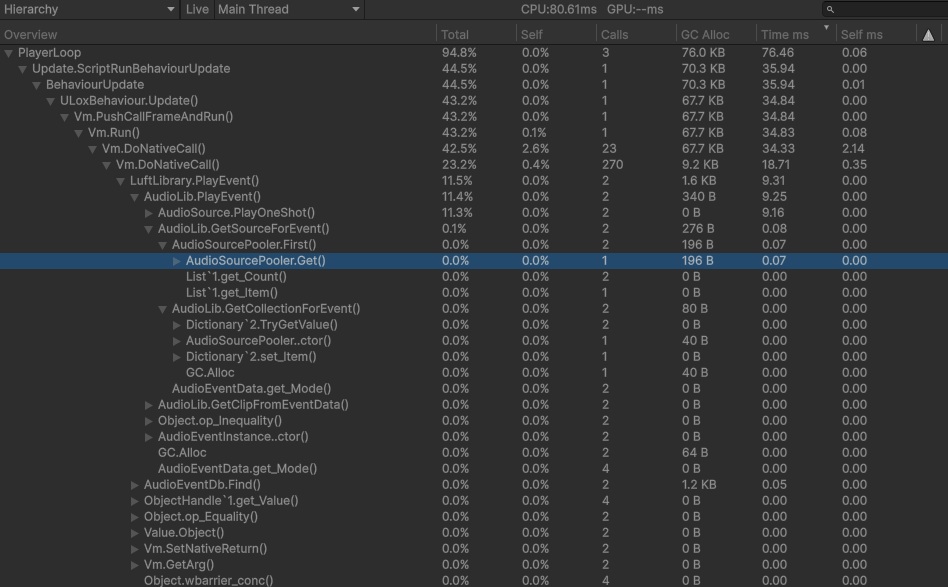
Deep profiling showing GC Alloc per function call
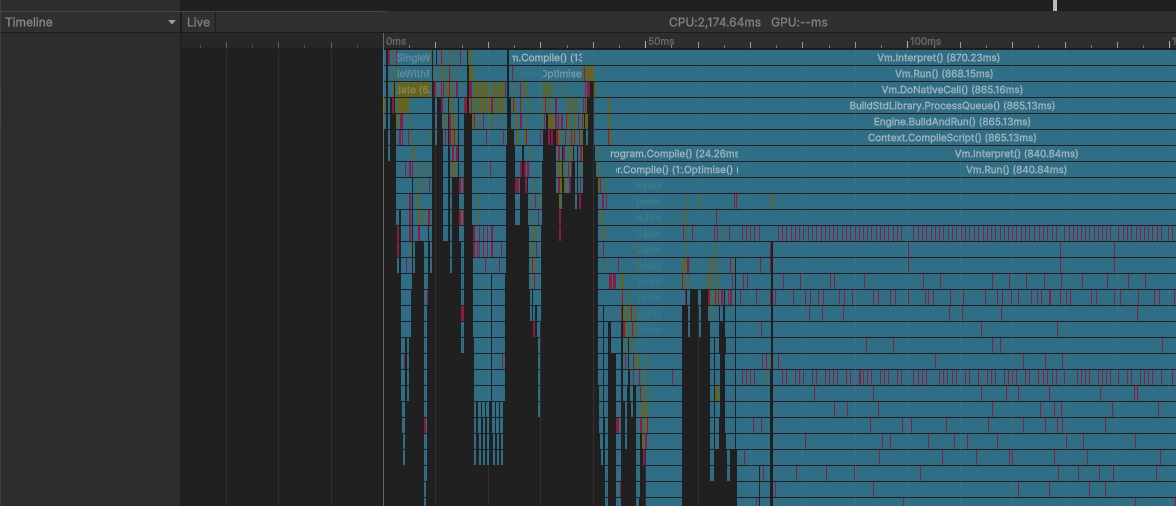
Deep profiling showing GC Activity as Red bars in the Timeline
Ensure you are correctly letting go of resources you no longer intent to use
That might be nulling out references when you are done with them or using weak pointers/references. You might find you are restructuring your code so there’s clearer lines of ownership and responsibility, making cleanup more straightforward. If you give the runtime the truer picture of what memory is in use and what isn’t, you’ll ease up the pressure, spend a bit less time striding through allocations you don’t want anymore, and hopefully trigger less collections that take less time to complete.
Move per instance collections to a shared collection.
Let’s say your EnemyBehaviour script is responsible for the effects related to it taking damage, perhaps an array of AudioClips to choose from when it is impacted. If there are 100 enemies that’s 100 arrays that all hold the same audio clip references. You probably never change that array over the lifetime of those enemies. That’s 100 arrays that have to be checked are still in use each GC collect. When you destroy those enemies, that’s 100 arrays that are now garbage that have to be cleaned up. You can see how this multiplies to being an awful lot of unnecessary allocations if this pattern is repeated and on lots of components, on lots of GameObjects. If you move these unchanging arrays into ScriptableObjects that array is allocated once but referenced in many places, and you can still drag and drop and edit its contents in the inspector.
Let’s take our EnemyBeh from before, we could do it for a number of things, but let’s just show the LevelUpData
Now we can make a LevelUpDataSo as an asset in our project and assign it where needed. Now that it’s a UnityObject, Unity will manage that lifetime and each object that wants it is sharing the same one. For things that don’t change, shared SO’s or centralised systems are a handy way to consolidate usage, and reduce spikes in garbage when things are created or levels loaded.
Keep an eye out for garbage generating functions that are repeated but give the same results.
Consolidating things into one place instead of many can be an easy win. One common example is using a FindObjectsOfType each frame inside a MonoBehaviour on many objects. Having objects add and remove themselves from a central shared list is not only probably much faster, it won’t generate garbage when it does its job. Along the same lines, you might be able to take garbage generating functions and reprocess the data into a less GC generating form, maybe once at startup of the app or even restructuring the data via script in the editor.
There will always be some GC.
Even if you manage to minimise or remove all of your code’s garbage creation, there’ll still be some, from the instances you are using that Unity gives you, and from the other C# systems running in your game (either third party or from Unity itself). Meaning if you want to hold a specific framerate you have to account for some GC time in your worst frame, need to leave a bit of space for it. If we make very little garbage then it’ll want to run less often, and we can maybe spread that workload out over more frames.
Force the garbage collector to run when you know you can spare the perf, e.g. during low perf requirement sequence (cutscene), or non gameplay impacting area level load. Perhaps your game has periods of low performance requirements that you can do some cleanup during. After a level load is a good time to try to force a collect, Unity probably just let go of a bunch of objects that are now garbage. This may be especially true if your game has lots of instances that live on components, or you use external data to configure things during the loading or unloading process (like loading stats from a json file that isn’t just kept in memory forever).
Ensure you are using incremental GC.
Instead of one very expensive frame, you get a sequence of more expensive frames, but each one much less extreme. Beyond that you can manually tweak GarbageCollector.incrementalTimeSliceNanoseconds if you are very close to your frame budget.
If you are trying to maintain 60fps, and you’re already using 16.667ms cpu time every frame, there’s no time left for the GC to run without hitting the frame rate. Unity says it uses ‘excess’ cpu time based on target framerate to do incremental GC, but if your target isn’t being reached, your frame time varies a lot frame to frame (a different undesirable problem), or you want to be hitting very high framerates, that might not be enough on its own. In some theoretical sense you could consider lowering the time spent per frame on incremental collection such that it completes a full collection just before it needs to start another and treat that as the constant per frame GC budget.
Also be careful when you want a full stop the world collect `GC.Collect` vs an incremental `GarbageCollector.CollectIncremental`. The former will trigger the stop to world to collect everything logic even if you have turned on incremental GC in Unity's settings.
Pre-allocate
Pre-allocate buffers/chunks/objects you need up front, rather than when first needed. And force a GC collect after your game has completed its loading. This can help, as it sets the amount of GC pressure closer to the high water mark from the get go. Rather than the runtime seeing usage creep up by large chunks on a regular basis, prompting a gather and collect when the allocations aren’t garbage (at least not yet).
Diminishing Returns
At some point in this endeavour you may run out of straightforward changes to make and larger reworks might be required. At that point getting enough cpu time available for the GC to run via other optimisations might be less engineering effort than continuing to reduce the amount of GC pressure and the frequency of its collections. It warrants some investigation. Beyond here are some approaches to decrease the total allocations more directly; rather than minimising the amount of garbage generated. The returns on decreased GC time are most likely marginal, but they may also result in general performance improvements.
Re-arrange independent objects into systems.
When we do this we often find there are common chunks of both shared computation and storage. 100 enemies independently caching ray cast results can be re-arranged into a system that calculates the results for each in the same storage area in turn. It also more easily unlocks other optimisations and trade offs you might want to explore, like spatial partitioning or update time/frame slicing.
A forest of pointers structure, like a graph, where each node within it is allocated and referenced by others tends to end up with a lot of small allocations. And when the structure or data is changing this naturally tends towards creating lots of garbage to be collected. There may be some GC wins in flattening that structure out into arrays and indices rather than direct pointers. Less things to chase down and more inclined for elements to be reused, and might have some other benefits. This often also results in less total memory use, better cache locality, and reduced fragmentation. All good wins to have, but the shift can be quite uncomfortable for programmers more familiar with interconnected objects rather than top down system approach.
If you really want to get memory out of the hands of the garbage collector, you could move arrays of structs into Unity’s native collections. Usually you’d go through this effort to take advantage of the job system and burst compiler. Even if you don’t go the last few steps to take advantage of them, you might get some GC wins by moving large chunks of data outside of the GC’s grasp. That does mean you need to deal with lifetimes of these arrays yourself. You’ve probably noticed the pattern here though, memory and lifetimes are not the same thing, and treating them as the same causes a lot of memory churn that the GC has to deal with.
